
Many tables have had a QR code for years, and more and more now carry an NFC sticker too. Most comparisons online come from companies selling one of the two, and plenty are about payments. This one is about something else: what gets a guest at your table to your menu, your review page or your stamp card most reliably?
What is the difference between NFC and a QR code?
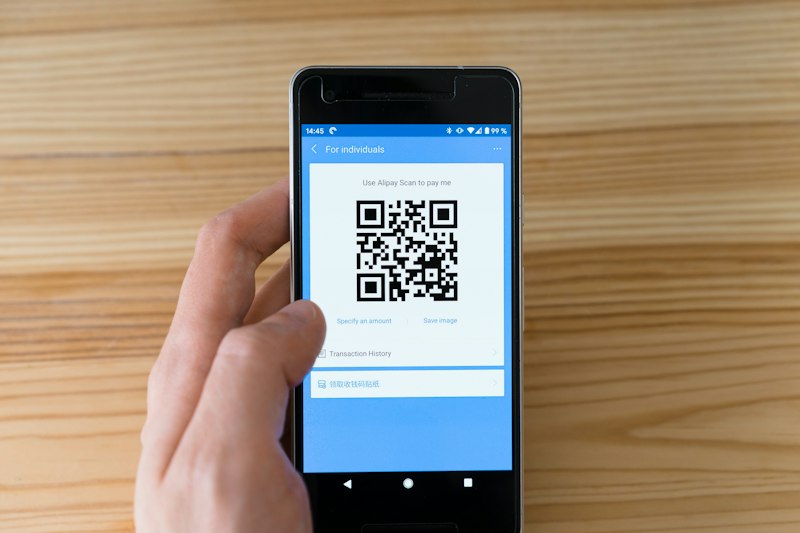
An NFC sticker holds a tiny chip with a web address, and a QR code is the same address as a printed pattern. With NFC the guest holds the phone to the sticker. With a QR code they point the camera at it. The NFC Forum gives NFC a typical range of up to 2 centimetres, and it works without a battery. The QR code has been an international standard, ISO/IEC 18004, since June 2000.
| NFC sticker | QR code | |
|---|---|---|
| What the guest does | Holds the phone close, taps the notification | Opens the camera, aims, taps the link |
| Distance | A few centimetres | Further away, depending on print size |
| Light | Doesn't matter | Needs enough light |
| On metal | A normal sticker usually fails | No problem |
| Older phones | Some need a workaround, some can't | The camera app is usually enough |
| Familiar to guests | Needs a short hint | Most know it |
| On flyers, posters, Instagram | Not useful | Yes |
Which phones read NFC, and when does it fail?
The iPhone XS and every newer iPhone read NFC without an app, according to Apple's developer documentation. Android phones usually look for tags whenever the screen is open, unless NFC is switched off in settings, says the Android documentation. Few comparisons mention the next part: even a compatible phone doesn't always respond.
| Situation | What happens |
|---|---|
| iPhone with the camera open | Apple names the camera as a case where background reading isn't available. A guest who is about to scan can't tap at the same moment. |
| iPhone in airplane mode or with Wallet open | Apple says background reading isn't available here either. |
| Locked iPhone | The iPhone first asks the guest to open it. |
| iPhone 7, 8 or X | No background reading. A University of Montana guide describes a workaround through Control Center. |
| Android with NFC off | Nothing. The guest has to switch it on in settings. |
| Android 17 | The Android documentation says web links now bring up an "open link" notification that the guest has to tap. |
| Thick case, phone pulled away too fast | Google names these for contactless payment. A sticker uses the same kind of radio connection. |
Set your expectations accordingly. On an iPhone the page doesn't open by itself. The phone shows a notification, and only tapping it opens the link. As of November 2026, a "tap" is usually two small movements.
Is NFC really faster than a QR code?
For guests who know NFC, there's no aiming, and that feels quicker. We didn't find an independent measurement from cafés or restaurants, so we won't give you seconds. Plenty of vendor pages do, without saying how they measured.
The clear difference is with guests who don't know NFC. Without a hint, they have no idea what the small sticker is for. Most already know a QR code. So at the table the short line next to it matters more than the technology.
Where does NFC belong, and where does the QR code?
NFC belongs where the phone is already in hand and the guest is right in front of it. The QR code belongs everywhere, and on its own wherever people can't get close.
| Place | What fits | Why |
|---|---|---|
| Table | NFC and QR | The guest is seated and has time |
| Counter, till | NFC and QR | A short moment while waiting |
| Metal table or counter | QR, NFC only after testing on a non-metal spot | Metal interferes with the chip |
| Shop window, door | QR | Seen from a distance |
| Flyer, poster, screen, Instagram | QR | You can't print or post a chip |
| Bill, bag, goodbye | NFC card with QR | The guest takes it along |
The guide to NFC stickers for restaurants goes deeper on placement, metal and older phones.
What can go wrong with a QR code?
- No margin. A QR code needs a clear margin four modules wide on every side, according to its inventor. A module is one of the small squares. A frame or logo right against the code gets in the way.
- Too little error correction. QR codes can make up for damaged areas. Level M handles 15 percent, level Q 25 percent. For a table that gets wiped daily, the higher level is the better choice.
- Codes stuck over yours. Germany's consumer advice centre, the Verbraucherzentrale, warns about fake QR codes stuck over real ones, so far mostly on charging points and parking machines. When you set the tables, check the code is still yours.
- The address changes. A printed code leads to the same address forever. If that's a PDF that later moves, guests land nowhere. Print only an address that will last.
What can go wrong with NFC?
- Metal. A normal sticker on metal often doesn't respond at all. Metal just under a thin top can interfere too, so test before you stick.
- Overwriting. A chip that isn't locked can be rewritten with a phone. Android describes locking as a one-way process that can't be reverted. Ask when you buy whether the stickers arrive write-protected.
- No hint. For many guests a silent sticker is just a sticker.
How can you find out in a week what works for you?
- Put a sticker and a code on five tables and at the till, both leading to the same page.
- Write next to them what happens: "Hold your phone here or scan the code: menu and reviews."
- Test each spot with an iPhone and an Android phone before guests arrive.
- Give NFC and QR two different links, or you can't count anything.
- After a week, compare taps and scans per spot, not just in total.
- If one spot stays almost empty, it's usually the spot. Move it before you change the technology.
- "Hold the top of your phone here, or scan the code."
- "Menu, reviews and stamp card: tap or scan here. No app needed."
- For your team: "Just hold your phone to the sticker, and a notification comes up. Or scan the code."
Why not just pick one?
QR alone gives up the easy route for guests used to NFC. NFC alone shuts out everyone whose phone doesn't respond. Both together take little space and lead to the same page, so you lose nothing.
How do you set up sticker and code without programming anything?
NFCeez NFC stickers come round or square, with your logo and a QR code on them as well. There's also the NFC card to hand out. A tap or a scan opens your Smart Page with menu, review, stamp card and booking, and guests need no app. In the app, under Products, you hold your phone to the sticker, and from then on it belongs to your business. Before the first guest, you test each sticker in the app. Afterwards you see how many guests tapped, scanned or came directly, without setting up two links yourself. The limits: every NFCeez sticker stays connected to its place for good and can't be moved, and on metal the same applies as above, so test first. The NFC stickers page shows what they look like.
What do you do today?
Your next step: take an iPhone and an Android phone to your busiest table today and try where a sticker and a code would be easy to reach. If there's metal in the way, you'll see it right away.
How NFCeez does thisTap and scan, to the same page.Every NFC sticker also carries a QR code and opens your Smart Page with no app. The app shows how many guests tapped, scanned or came directly.See how it works- Apple Developer: Adding Support for Background Tag Reading (Core NFC)
- Android Developers: NFC basics
- Android Developers: Ndef reference (makeReadOnly)
- NFC Forum: NFC technology
- DENSO WAVE, QRcode.com: Standardization
- DENSO WAVE, QRcode.com: Error correction feature
- DENSO WAVE, QRcode.com: Margin and module size
- Verbraucherzentrale: Quishing, Stand 23.10.2025
- Google Wallet Help: Fix problems with contactless transactions
- University of Montana: iPhone NFC activation guide